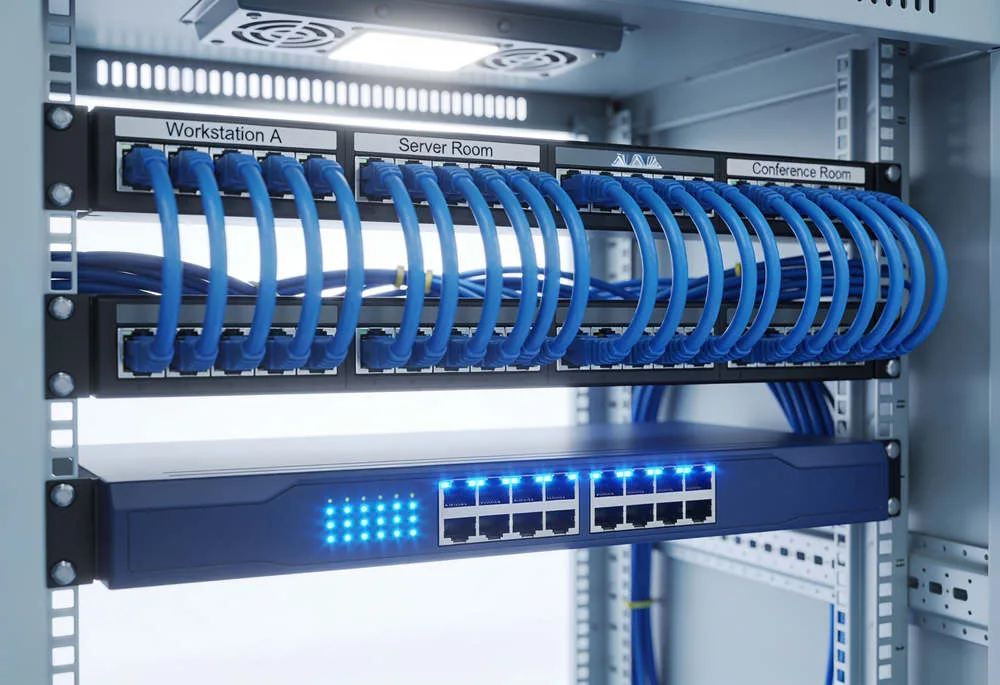
The biggest myth in smart home technology is that a strong network does not matter. In reality, every connected device depends on a strong, continuous, uninterrupted connection, and weak Wi-Fi is often the reason automation keeps dropping offline. For a connected home near Wekiwa Springs State Park, the real fix is usually a wired backbone, not another consumer Wi-Fi extender.
If lights, TVs, cameras, streaming devices, or control systems keep disconnecting, call Axiom Integration at (407) 775-2222, or schedule an in-home survey with Axiom Integration to find the weak points before adding more equipment. In homes around Lake Eola, dense device loads and competing wireless signals can make a poorly designed network even less reliable.
A large home near Park Avenue in Winter Park may have beautiful automation and premium AV equipment, yet the experience falls apart if everything competes for Wi-Fi. The network should be treated as infrastructure, just like electrical wiring or plumbing, because every connected system depends on it.
Why smart home Wi-Fi keeps dropping
When homeowners ask, "Why does my smart home Wi-Fi keep dropping and how do I fix it?" the answer is often network overload, poor access point placement, weak coverage between rooms, or too many stationary devices using wireless connections that should have been wired.
A smart TV may buffer. A control processor may lose communication. A streaming device can freeze at the worst moment. These look like separate equipment failures, but they may all point back to the same network problem.
The number of connected devices has also grown. In 2026, a home may include lighting controls, thermostats, cameras, speakers, televisions, appliances, shades, doorbells, and Matter-enabled devices. Asking one basic router to handle everything reliably is no longer realistic in many properties.
Hardwire everything that does not move
Axiom's standard is straightforward: if a device does not move, hardwire it whenever possible. That includes TVs, desktop computers, control systems, receivers, projectors, streaming devices, and appliances with an RJ-45 port.
Wi-Fi should be reserved mainly for devices that are genuinely portable, such as laptops, tablets, and phones. This reduces wireless congestion and gives fixed equipment a more stable path for communication.
That approach is especially important for home automation, where one unreliable connection can affect the way several systems work together. A wired backbone gives those systems a dependable foundation instead of forcing every device to compete for airtime.
Enterprise-grade networking is no longer just for offices
Modern connected homes increasingly need network design that resembles a small enterprise environment. That can mean structured cabling, managed switches, a wired backbone, and access points placed according to the home's actual layout rather than wherever a router happens to fit.
Managed switches help organize wired connections and support a more controlled network. Well-placed access points improve wireless coverage for portable devices. The wired backbone carries traffic for stationary equipment that should never have depended on Wi-Fi in the first place.
The goal is not to make a house unnecessarily complicated. It is to remove avoidable points of failure.
Your AV system depends on the network too
Streaming video, multi-room music, receivers, projectors, and other AV components can place real demands on a home network. When these devices are left on Wi-Fi unnecessarily, they compete with phones, tablets, cameras, and every other wireless product in the house.
A properly designed distributed audio and video system benefits from reliable wired connections wherever the equipment allows them. That can reduce dropouts and make the experience feel consistent from room to room.
More Matter-enabled devices make network planning more important
Matter is designed to improve interoperability among smart home products, but compatibility does not eliminate the need for sound network infrastructure. More connected devices still mean more communication across the home.
A network should be planned for the number of devices in the property, the materials used in the walls, the home's size, equipment locations, and how the family actually uses technology. A solution that works in a compact house may be wrong for a large residence with detached spaces, outdoor entertainment areas, or extensive automation.
Why another Wi-Fi extender may not solve the problem
Adding an extender can sometimes improve a weak signal in one area, but it does not fix every network problem. If too many stationary devices remain wireless, access points are poorly positioned, or the underlying cabling and switching are inadequate, another extender may simply add another layer to an unstable design.
This is why troubleshooting should start with the whole system. Where does the internet enter the home? Which devices can be wired? Where are the access points? What construction materials block signal? Which rooms experience failures, and when?
Those answers are more useful than buying another piece of equipment and hoping it works.
Axiom starts with the home, not a one-size-fits-all package
Axiom Integration begins with an in-home survey to understand the property, the client's needs, the existing equipment, and the available budget. That matters because no two homes have the same layout, construction, device count, or priorities.
Some properties need better access point placement. Others need more devices moved off Wi-Fi and onto Ethernet. A larger automation system may require a stronger wired backbone and managed network equipment. The recommendation should follow the home, not the other way around.
Call Axiom Integration at (407) 775-2222, or book an in-home network survey with Axiom Integration to find out why your Central Florida smart home keeps dropping offline and what it will take to build a stable connection.